A few days ago, a friend showed me how he uses Claude AI to generate reports about his online store. Some of the insights were straightforward, things you could easily get from a pivot table, like which color or size sells the most. Others were more involved, like figuring out how many orders come from coastal areas. Since he sells fishing gear, that kind of geographic insight could directly influence where to focus marketing efforts.
The real bottleneck in his workflow wasn’t the analysis, it was the setup. Every time, he had to log into the store’s back office, export an Excel file, and then upload it into Claude. It worked, but it was clunky and repetitive. So I offered to help automate it.
Enter MCP Servers
MCP (Model Context Protocol) servers are becoming a popular way to connect AI models directly to external data sources. Instead of manually feeding data into an AI, you expose structured endpoints that the model can query on demand. In practice, this turns your data into something the AI can “talk to” in real time.
With that in mind, I started simple. A quick prompt into Claude Code gave me a basic Python script. I plugged in my WooCommerce REST API credentials and gave it a try.
It worked.
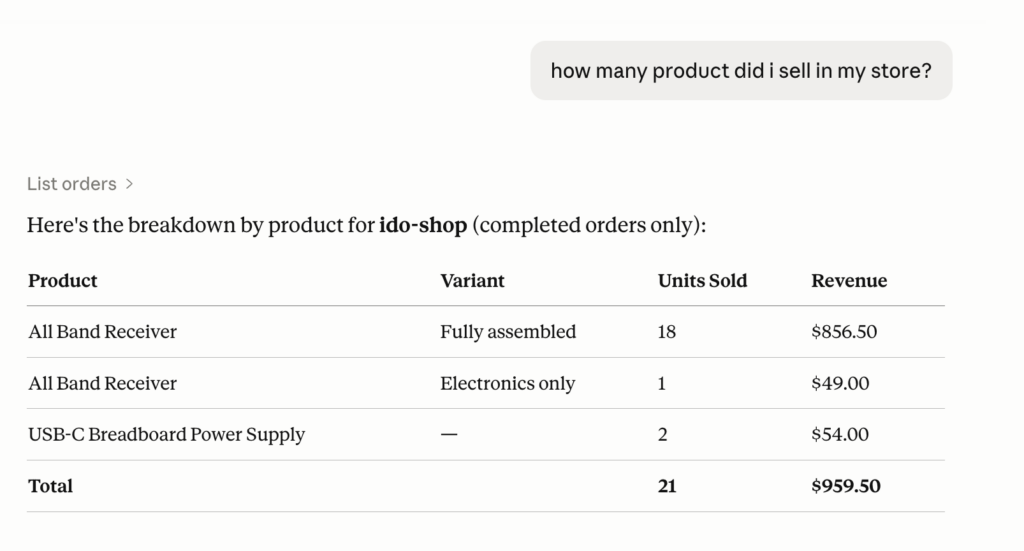
Encouraged, I moved on to my friend’s store, which had more data and real-world usage. That’s where the first issue showed up.
The First Hiccup: Pagination
WooCommerce’s API returns paginated results. That means instead of getting all orders in one response, you have to fetch them page by page. For an AI agent, that translates into multiple API calls, which quickly eats into usage limits and slows things down.
To fix this, I moved the aggregation logic into the MCP server itself. From the AI’s perspective, it became a single query even though the server was doing multiple requests behind the scenes.
That helped, but performance was still an issue.
Even at 100 orders per page, fetching everything sequentially took too long, sometimes long enough to hit timeouts.
Parallelization
Next step: parallel workers.
Instead of fetching pages one after another, I pulled multiple pages at the same time. This significantly reduced the total wait time and made the system feel responsive enough to be usable.
Still, I wasn’t satisfied.
Caching for Speed
The real breakthrough came with caching.
Rather than hitting the API every time, I cached the results locally. Each query now returns almost instantly, and the system only checks for updates (“orders modified since last fetch”) every few minutes.
This turned a slow, multi-call process into something that feels immediate.
Data Shape Matters
After switching from MCP Inspector to Claude Desktop, I noticed something interesting: responses were still slower than when we used Excel files.
One likely culprit was the size and complexity of the JSON responses.
So I simplified things:
- Removed unnecessary metadata fields
- Flattened the structure (e.g.,
billing.address.city→billing_address_city) - Reduced payload size overall
This made a noticeable difference. Smaller, flatter data structures are simply easier, and faster, for AI models to process.
One Last Gotcha (Windows + Excel Exports)
One final hiccup we ran into had nothing to do with APIs or performance.
My friend was working on a Windows machine, and Claude Desktop kept struggling to export Excel files. After some digging, it turns out this feature relies on a WSL (Windows Subsystem for Linux) sandbox behind the scenes.
The fix was simple:
- Run
wsl --install - Make sure virtualization is enabled in the system
Once that was in place, Excel exports worked as expected.
Final Thoughts
What started as a simple automation turned into a small system design exercise:
- Reduce API calls
- Parallelize where possible
- Cache aggressively
- Keep data structures simple
The end result is a much smoother workflow: no more manual exports, no more uploading files. just direct, conversational access to store data.
The code is available on GitHub. If you want help setting something similar up for your own store, feel free to reach out.
Leave a Reply